

As an Amazon Associate we earn from qualifying purchases. If you buy through links on this page we may receive a commission at no extra cost to you. Product details come from Amazon listings and can change.
Finding the best budget drawing tablets for preschoolers means balancing three things: a screen small hands can handle, a price that does not sting when the tablet gets dropped, and a design that keeps a three or four year old busy without a grown up hovering over every swipe. This guide looks at eight picks from the listings we reviewed, mostly pocket friendly LCD doodle boards sold in multi packs, plus two standalone tablets that sit at the other end of the scale.
The guide is written for parents, grandparents, preschool teachers and anyone filling a goody bag for the three to five crowd. We explain what each listing says it includes, who it really suits, and where a pick is a poor fit for this age group. Where a product is built for older kids, we say so plainly.
Prices change often, so we link to live listings instead of quoting numbers. Use the pack size and the notes on each pick to work out your value per child, then check the current listing before you buy.
Key Takeaways
Best Budget Drawing Tablets For Preschoolers at a Glance
| Product | Our score | |
|---|---|---|
| 4 Pack Erasable LCD Doodle Board Best Overall |
9.4 / 10 | Check Price |
| 20 Pack Classroom LCD Tablet Best for Classrooms |
9.2 / 10 | Check Price |
| 12 Pack Party Favor LCD Tablet Best for Party Bags |
8.8 / 10 | Check Price |
| 18 Pack LCD Writing Tablet Best Multi Child Value |
8.8 / 10 | Check Price |
| Genialba 4 Pack LCD Tablet Best Color Coded Set |
9.2 / 10 | Check Price |
| 4 Pack LCD Writing Tablet Best Pressure Sensitive Pack |
9.0 / 10 | Check Price |
| PicassoTab 10 Inch Standalone Best Supervised Step Up |
8.8 / 10 | Check Price |
| RubensTab T11 Pro Best for Older Siblings |
8.8 / 10 | Check Price |
How We Chose the Best Budget Drawing Tablets For Preschoolers
This is a research based guide, not a lab comparison. We read each listing closely, noted the screen type, size, pack count, included accessories and any safety related wording, and then asked a simple question: would this make sense in the hands of a child aged 3 to 5? We also weighed the kind of value a budget buyer cares about, such as how many children one purchase can serve, whether the surface can be reused without refills, and how easily a wipe or a button press resets the drawing.
Every pick also carries an editorial score out of 10 on the site, built from features, specs and use case fit for this specific age range. Because the data comes from listing details, we speak in terms of what the listing says and what buyers can reasonably expect, and we never invent specifications. Items that look better suited to older children are kept in the list only when we can explain honestly how they fit, and we flag the limits.
In-Depth Reviews
1. 4 Pack Erasable LCD Doodle Board: Best Overall
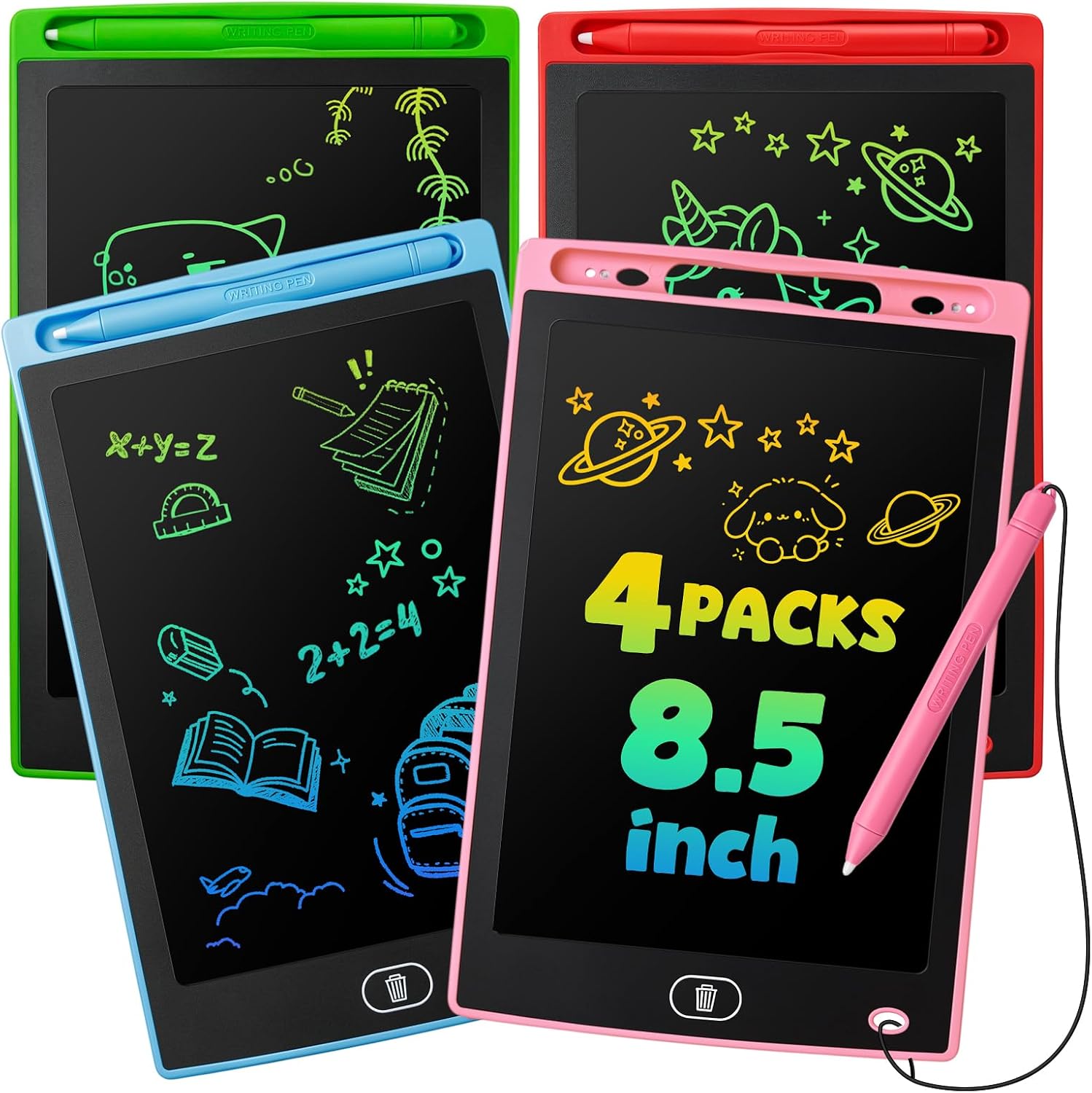
Our score: 9.4/10 iOur editorial score (1 to 10), based on listing specs, features and how well each pick fits its use case. It is not an Amazon customer rating.
4 pack 8.5 inch LCD Stylus included Erase and lock buttons
The 4 Pack Erasable LCD Doodle Board earns the top spot because its listing describes the features a preschool household actually uses: a stylus, a button that clears the screen, and a lock button. That combination keeps a young child drawing instead of waiting for a grown up to fix something. The thin, lightweight build also suits small arms that tire quickly. For a budget buyer, four boards in one order is a sensible way to cover siblings or a car ride with two kids.
Each board is an 8.5 inch LCD writing surface, the same style as a magnetic doodle pad but without any mess or loose pieces to lose under the sofa. The child presses the stylus on the screen to leave a mark and presses the erase button to wipe the whole thing clean. The listing says the lock button can protect a drawing from being cleared by accident, which is a handy trick when a proud artist wants to show it to a parent.
The listing also mentions spelling, calculation and drawing, and calls it suitable for preschool or homeschool. For a three year old that mostly means scribbling, tracing shapes and copying a first letter. A four or five year old can try writing their own name, drawing a family and counting dots. The lock feature helps a teacher or parent capture a worksheet moment before it disappears. Sitting together for a few minutes of shared doodling also builds language, because children love to explain what they drew.
One honest caveat: erase is all or nothing, so a child cannot rub out just one line, and nothing is saved for later. Parents may want to take a photo of a favorite drawing before clearing it. Check the battery compartment is secure, since small cells are a hazard for toddlers who put things in their mouths, and keep younger siblings away from the stylus tip. Grandparents often like this format too, since the controls are easy to explain over a video call.
2. 20 Pack Classroom LCD Tablet: Best for Classrooms

Our score: 9.2/10 iOur editorial score (1 to 10), based on listing specs, features and how well each pick fits its use case. It is not an Amazon customer rating.
20 pack 8.5 inch LCD No backlight Backpack friendly
Teachers and daycare leaders will find the 20 Pack Classroom LCD Tablet the most practical bulk option here. The listing frames it as goody bag stuffers, birthday return gifts and classroom rewards, which matches how many preschools hand out small treats. Twenty boards in one order cover a full class, a sticker chart reward cycle, or a library corner, and the per child cost of a pack this size is usually far lower than buying tablets one at a time. Fewer paper handouts also means less to sweep up at the end of the day.
The listing describes an eye protection LCD surface that is glare free and paper like, with no backlight. In plain terms, it is a pressure writing pad rather than a glowing screen, which many parents like for children who already see plenty of tablets and phones. The boards are described as ultra thin and lightweight, so they slide into a backpack, a cubby or a cardboard box without adding bulk. That makes the pad a calm choice for children sensitive to bright lights.
For ages 3 to 5, these work best as a quiet time activity. A child can trace a line, draw a circle, copy the first letter of their name or play a guessing game with a friend. The listing also pitches them as mess free travel toys, which is helpful at assemblies, on the bus and during waiting room visits. Teachers can use them in small groups for letter practice without handing out paper.
Think through logistics before ordering. Twenty identical boards can look the same, so a sticker or a marker on the back helps each child recognize their own. Supervise the first few minutes so no one chews on the stylus or pokes the screen too hard. Adults should check the battery area, and a spare or two helps because a dropped board can end up scratched. Keeping a labeled bin near the door makes cleanup quick for busy staff.
3. 12 Pack Party Favor LCD Tablet: Best for Party Bags

Our score: 8.8/10 iOur editorial score (1 to 10), based on listing specs, features and how well each pick fits its use case. It is not an Amazon customer rating.
12 pack 8.5 inch LCD Pressure sensitive Erasable
If you are planning a preschool birthday and need a favor that parents will not groan about, the 12 Pack Party Favor LCD Tablet is a tidy answer. The listing names it as a party favor and describes an erasable doodle pad suited to toddlers and young children. A dozen fits a typical guest list with a couple spare for the birthday child and any surprise guests, and a board is more reusable than a bag of stickers that gets thrown away.
Each unit is an 8.5 inch colorful LCD writing tablet. The listing says the technology is flexible liquid crystal and pressure sensitive, so a lighter touch makes a thinner line and a firmer press makes a bolder one. Children can draw, write, practice spelling or do simple math, and one button clears the surface for the next idea. There is no paper, ink or mess, which is a relief at a party where there is already cake. Children also enjoy showing a friend how the line gets darker.
For the 3 to 5 age group, the draw is the instant reward of making a mark. A three year old will mostly scribble and giggle when the line changes weight, while a five year old might draw a birthday card for the host. The age range in the listing runs a little older, so the boards also work for older siblings who tag along. It makes a calm activity for the car ride home. Teachers who attend the party can reuse the idea for quiet corner time.
Keep a few practical points in mind. Party goers may drop them, so choose the hosting area carefully and expect the occasional scuffed corner. Parents of toddlers under three should check small battery and stylus parts before handing one over. Include a quick note in the goody bag asking adults to supervise young children, and consider adding a name sticker so siblings do not end up in a tug of war. A short instruction card tucked into each bag helps parents too.
4. 18 Pack LCD Writing Tablet: Best Multi Child Value

Our score: 8.8/10 iOur editorial score (1 to 10), based on listing specs, features and how well each pick fits its use case. It is not an Amazon customer rating.
18 pack 8.5 inch LCD Flexible liquid crystal Pressure sensitive
The 18 Pack LCD Writing Tablet suits households and groups that need more than a handful of boards but fewer than a full class set. Think of a large family, a church nursery, a playgroup with rotating members or a cousin gathering at holiday time. The listing describes an 8.5 inch colorful tablet in an eighteen pack, which spreads the cost across many children and leaves some boards in reserve when one goes missing. Group leaders can also hand them out as small prizes through the year.
The product details describe flexible liquid crystal technology that responds to pressure, so line thickness changes with how hard a child presses. It is meant for drawing, writing, spelling, math and notes. Because it is a simple LCD pad, there is no app to install, no account to create and no internet link to worry about, which many parents of three year olds appreciate. Everything happens by pressing a stylus or a finger on the surface. A single stylus and screen keeps the rules of play very easy to explain.
What does it teach? For preschoolers, mainly fine motor control, pencil grip practice through the stylus and early shape and letter recognition. Children learn that pressing harder changes the result, a first lesson in cause and effect. Older siblings can use the same board for spelling words and simple sums, which makes the pack easy to share among different ages. Tracing a letter from a card and then trying it freehand is a good routine.
On the practical side, label each board with a sticker or name so eighteen similar boards do not cause squabbles. Keep a small stash in a drawer and rotate them out so the novelty lasts longer. Supervise very young children around the battery area and stylus, since the listing aims at ages 3 to 8, and remember that erased drawings cannot be recovered. Rotating a few boards at a time keeps the novelty fresh for longer.
5. Genialba 4 Pack LCD Tablet: Best Color Coded Set

Our score: 9.2/10 iOur editorial score (1 to 10), based on listing specs, features and how well each pick fits its use case. It is not an Amazon customer rating.
4 pack Pink, blue, green, purple 8.5 inch LCD Ages 3 to 8
The Genialba 4 Pack LCD Tablet stands out for something simple: each board comes in its own color. The title lists pink, blue, green and purple, which turns a common sharing problem into a game. When four preschoolers sit around a table, each can claim a color and know which board is theirs. For families with siblings close in age, that small detail can save plenty of arguments. Parents of twins or close age siblings may find this the most peaceful way to share.
Beyond color, the title describes an 8.5 inch LCD writing tablet and doodle board marketed as an electronic drawing pad for kids aged 3 to 8. The data for this pick lists no feature bullets, so we stay with the title and general knowledge of LCD pads: a pressure writing surface, a stylus or fingertip for marking, and a button to clear the screen. Check the live listing for the exact details of the included accessories. The title also frames it as a learning gift for toddlers and young school children.
As a learning tool, the colors can be part of the lesson. A parent can ask a child to draw something that matches their board, like a purple grape or a green frog, which links drawing to color words. Four year olds enjoy trading boards and trying each color. Five year olds can start writing letters and short words, then clear the screen to try again without wasting paper. Color talk is a gentle way to expand a young vocabulary.
As with any electronic pad, adults should look after the batteries and keep small parts away from children who still mouth objects. The boards are lightweight, so they are easy to carry, but the screens can scratch if tossed in a bag with keys or crayons. A simple sleeve or a spot on a shelf keeps them neat, and a quick check of the listing confirms what comes in the box. Always compare the live listing with what you expect before gifting.
6. 4 Pack LCD Writing Tablet: Best Pressure Sensitive Pack

Our score: 9.0/10 iOur editorial score (1 to 10), based on listing specs, features and how well each pick fits its use case. It is not an Amazon customer rating.
4 pack 8.5 inch LCD Pressure sensitive Spelling and math
The 4 Pack LCD Writing Tablet highlights what makes LCD doodle boards fun for young artists: lines that change with pressure. The listing says the flexible liquid crystal technology is pressure sensitive, so a gentle touch gives a thin line and a firm press gives a thick one. For a preschooler, that response feels like magic and encourages them to experiment, which is the heart of early drawing play. It is a friendly first board for a child who has never used one.
The board measures 8.5 inches and is described as a colorful kids LCD doodle board for drawing, writing, spelling, math and notes. A pack of four works well for a family with two or three children, with a spare for the car. Like the other LCD pads, it does not use paper or ink, so there is nothing to spill and no markers to cap, which makes it an easy tool to hand over when you are busy.
This pick suits children who like to explore how lines behave. A three year old can scribble big loops and see them grow bolder with effort. A four year old can try drawing a sun with thin rays and a thick center. A five year old may start tracing numbers and letters shown on a card. The listing also offers a birthday gift angle for ages 3 to 8, which is helpful for gift buyers.
There are a few limits to remember. Erasing clears the whole screen, so keep expectations modest about saving artwork. The listing gives fewer details about buttons than some competitors, so look at the current page if a lock feature matters to you. Always supervise young children with small battery parts, and show them how to press with the stylus rather than a fingernail. A short demonstration from an adult usually solves most early frustrations.
7. PicassoTab 10 Inch Standalone: Best Supervised Step Up

Our score: 8.8/10 iOur editorial score (1 to 10), based on listing specs, features and how well each pick fits its use case. It is not an Amazon customer rating.
10 inch standalone No computer needed 5 creative apps Case and glove
The PicassoTab 10 Inch Standalone is a different kind of product from the LCD boards above, and it deserves an honest introduction. It is a portable 10 inch standalone drawing tablet that works without a computer, and the listing says it comes preloaded with five creative apps. That makes it a possible step up for a preschooler who has outgrown a scribble board, provided an adult stays close during use. Think of it as a bridge between a doodle board and a family tablet.
What is in the box, as the listing describes it? The bonus items include app upgrades and accessories such as a case and a drawing glove. The glove helps a child rest a hand on the screen without smudges, and the case adds protection against bumps. Because it is a full tablet with apps, there is more to set up than with an LCD pad, and an adult will need to manage the settings and installed software. Small hands may need a few tries to get used to the stylus and the glove.
For ages 3 to 5, this is best for the older end of the range, and only with supervision. A four or five year old can try simple coloring or sketching apps and learn how a stylus or finger creates strokes on a screen. Younger preschoolers will probably do better with a plain doodle board, which has no menus, no apps and no risk of wandering into something unsuitable. Treat each session as shared screen time rather than solo play.
Think about cost versus use. A tablet like this can serve a child for years as they grow into drawing apps, but it is fragile compared with a plastic board. Dropped screens are a real risk with small children, so a case and a soft surface help. Set screen time rules, check the apps before handing it over and keep it out of reach during meals and bath time. A clear routine for when and where it is used protects both the child and the device.
8. RubensTab T11 Pro: Best for Older Siblings

Our score: 8.8/10 iOur editorial score (1 to 10), based on listing specs, features and how well each pick fits its use case. It is not an Amazon customer rating.
10.1 inch Full HD IPS Standalone 5800mAh battery Battery free pen
The RubensTab T11 Pro is the least preschool oriented pick on this list, and we include it with a clear warning. The listing describes a standalone drawing tablet that needs no computer, with a 10.1 inch Full HD IPS screen. It looks like a tool for older children, teens and adults who want a more serious drawing setup. Parents of three to five year olds should consider it mainly as a family device shared with a bigger sibling. Think of it as a family art device first and a preschool gadget a distant second.
The details say it has a built in 5800mAh battery for up to 5 hours of use, and a pressure sensitive pen that needs no battery. A pen that does not need charging is helpful, since one less thing can die in the middle of a drawing. The screen is sharp and bright compared with an LCD doodle pad, which makes colors and details stand out, but it also means this is a real tablet with all the fragility that implies.
Who is this really for? An eight or ten year old who loves to draw may get far more from it than a preschooler. A three year old might enjoy scribbling on it alongside an older child, but a standalone tablet is easy to drop, expensive to replace and can be hard for small hands to hold steadily. We do not recommend leaving it with a young child alone, and it is not an everyday preschool toy.
Practical advice for parents: if you buy it, choose a sturdy case, set up child friendly restrictions and keep sessions short. Charging cables and the pen can be choking hazards for toddlers, so store them out of reach. A younger child can borrow it for a special family drawing time, but the LCD boards on this list are safer, simpler daily tools for ages 3 to 5. If your goal is a first drawing tool for a three year old, start with an LCD board instead.
How to Choose the Best Budget Drawing Tablets For Preschoolers
What budget really means for a preschool drawing tablet
For a three to five year old, budget does not just mean the lowest number on the label. It means the best use you get per child, per month, until the board is outgrown. A pack of LCD doodle boards can serve several children, travel to grandparents and double as party favors, so a larger pack often delivers more play per spent dollar than one premium tablet. Compare a few options before you commit, and avoid paying for features a young child will never touch.
It also means counting the hidden costs. Replacement batteries, cases, apps and accessories add up, and a fragile screen that breaks in a week is no bargain. Think about durability, sharing potential and how long the product stays interesting. The best value picks here are simple, forgiving and easy to replace if a board goes missing at the playground. Small, sensible choices protect the household budget without limiting creative play.
Age fit for three, four and five year olds
A three year old mostly wants cause and effect: press, see a line, press a button, see it vanish. Simple LCD boards suit that stage perfectly, because there is no menu to confuse them. Four year olds start drawing recognizable shapes and faces, and five year olds begin writing letters and numbers, so the same boards remain useful across all three years. Parents who watch their child for a week or two often learn which format fits best.
Standalone tablets with apps are a different story. They suit the older end of preschool, and only with an adult guiding the session. A toddler who is still mouthing objects is better off with a lightweight board under direct watch. Match the product to the child in front of you rather than the age printed on the box. Keep an eye out for signs of boredom or frustration, since those tell you when to switch tools.
Supervision and small parts at the preschool stage
Electronic drawing pads usually contain a small battery and a stylus, so adult supervision matters for children who still put things in their mouths. Look at the battery compartment on your board and make sure it is closed securely. If the cover loosens, stop using it until it is fixed, and keep spare batteries stored high and out of sight. Make these rules clear and simple so a young child can follow them at play.
Stylus tips and loose accessories are another point to watch. Store styluses in a labeled container, and teach children to use them only on the screen. For a classroom set, count the pieces at the end of each activity. These small habits keep the fun going and reduce the risk of anything small ending up where it should not. Consistent habits matter more than any single feature on the box.
Screen types: LCD pad versus full tablet
An LCD writing tablet has a pressure sensitive surface that darkens where the stylus presses and clears at the touch of a button. There are no apps, no internet and no backlit glow, as the 20 pack listing notes. A full standalone tablet has an IPS screen, apps and a battery measured in hours, so it is closer to a small computer than a toy. This keeps the choice simple and the use predictable.
For a preschooler, the LCD pad is usually the safer and simpler pick. The full tablet is more flexible but needs settings, updates and rules. If your child already uses a family tablet, a drawing board gives them a screen free way to draw. If they are ready for apps, a standalone model can be a next step with a grown up beside them. Decide on screen time limits before the product arrives.
Washable, non toxic and mess free thinking
One of the biggest perks of an LCD board is that there is nothing to wash. No marker stains the carpet, no paint ends up on the sofa and no crayon wrapper needs sweeping. For a messy preschooler, that is a real convenience, especially in cars, restaurants and waiting rooms where ordinary art supplies would be a stress. A soft cloth for fingerprints is usually enough care for the surface.
Labels such as ASTM D4236 apply to art materials like crayons and paints, not to electronic pads, so do not expect them here. Instead, read the listing for any safety wording, keep the board away from water, and wipe the surface with a soft dry cloth. A damp cloth on the casing can help with sticky fingers, but keep liquid away from the battery area. Keep a few tissues nearby for sticky hands during snack time.
Size, weight and storage at preschool scale
An 8.5 inch board is about the size of a small picture book, which is comfortable for small arms and fits easily into a backpack. The ultra thin, lightweight build mentioned in several listings helps a child carry it without help. A larger 10 inch tablet is heavier and can slip out of tiny hands, so a case with a grip is a good idea. Choose a spot that is easy for the child to reach without help.
For storage, a flat shelf, a bin or a large envelope works for boards. For multi packs, a shoebox with dividers keeps them organized and stops the surfaces from getting scratched. Label each board on the back so children can find theirs, and keep the styluses together in a small cup rather than loose in a drawer. Storing items at child height encourages independent play and tidy habits.
How to judge value in a multi pack
Multi packs are the heart of budget buying in this category. A four pack suits a family, a twelve pack fits a party, an eighteen pack covers a big group and a twenty pack handles a classroom. Divide your need by the pack size and buy the smallest pack that covers it, plus a spare, so you are not stuck with boards that nobody uses. Dividing the pack across rooms or backpacks can make it feel like more.
Also consider where the extras will go. Spare boards can become rewards, travel kits, gifts for neighbors or rainy day activities. If you cannot picture a use for the leftovers, a smaller pack is smarter. Always check the current listing for what is included, because bundles and accessories can change from one order to the next. A quick count of boards after each outing helps stop losses early.
Early learning with a doodle board
Drawing is practice for writing. A preschooler who traces a circle today is building the hand control needed to write the letter O next year. A doodle board makes this practice feel like play, because mistakes disappear at the press of a button and there is no paper pile to manage. That removes the fear of getting it wrong. Consistent praise for effort matters more than perfect lines.
Parents can turn it into a game. Draw a shape and ask the child to copy it, trace a letter with the stylus, or play a simple guess what I drew game. Count dots, make lines from one dot to another, and celebrate every attempt. Keep sessions short, since preschool attention is brief, and mix the board with paper and crayons for a fuller art habit. Short, happy sessions usually beat long ones at this age.
Common mistakes budget buyers make
A frequent mistake is buying the largest pack without a plan. Another is picking a full tablet for a three year old because it seems more grown up, then discovering it needs constant help. A third is ignoring the stylus and battery details and assuming everything is toddler proof. A quick read of the listing avoids most of these problems. Slow down and compare the listings before you check out.
Some buyers also forget about the child. A board with a lock button, bright colors or a name sticker can matter more to a four year old than a spec sheet. Others expect saved artwork, but erase is permanent. Take a photo of any drawing you love, and treat the board as a play tool, not a digital sketchbook. Reading a listing slowly is the smartest insurance against a disappointing purchase.
Gift and party favor tips
For gifts, a four pack is a thoughtful present for siblings, while a twelve or twenty pack suits party hosts and teachers. Pair a board with a small sketch pad and a few crayons to link digital and paper drawing. A color coded set like the Genialba pack avoids a fight over who gets which color. A handwritten tag with the child’s name makes the present feel personal.
Order early if the date matters, check the delivery window on the live listing and keep a gift receipt. Many boards need batteries already installed, so check the packaging. Add a short note asking adults to supervise little ones and keep small parts away from under threes, so the gift is welcomed by parents as well as children. Siblings sharing one gift is easier when each child has a clear role.
Care, cleaning and making boards last
Treat the board gently. Wipe the surface with a soft dry cloth, store it flat, and keep it out of hot cars and damp bags. Teach your child to press with the stylus rather than a fingernail or a pen, since sharp objects can scratch the screen. A small sleeve protects the surface during travel. Teaching children to put the board away is part of the fun.
If a board stops working, check the battery cover and replace the battery only with an adult present, then dispose of the old one safely. When a board is truly done, set it aside for recycling according to local electronics rules. A little routine care can stretch a budget pack across several years of preschool play. A little care at the start saves money later on.
Frequently Asked Questions
Are LCD drawing tablets safe for a three year old?
They are a common choice for ages 3 and up, but adult supervision still matters. Check the battery compartment is closed, keep the stylus away from mouths, and avoid leaving a toddler alone with the board. Follow the age guidance on the listing.
Do these tablets need batteries or charging?
LCD writing tablets generally use a small replaceable battery and do not need regular charging, though the listings here do not all say so. The standalone tablets use a rechargeable battery. Check the current listing before ordering, and keep spare batteries away from children.
Can a child save a drawing on an LCD board?
Usually no. The erase button clears the whole screen, and the drawing is gone. The 4 Pack Erasable LCD Doodle Board mentions a lock button that can hold a drawing until you are ready to clear it. Take a photo if you want to keep a favorite.
Is a standalone tablet a good first drawing tablet for preschoolers?
It can be for older preschoolers with a grown up nearby, but it is not the simplest choice. Apps, settings and fragile screens add complexity. The PicassoTab 10 Inch is described as ready to use without a computer, yet a doodle board is easier for most three year olds.
Which pick is best for a classroom?
The 20 Pack Classroom LCD Tablet is the most natural fit, since the listing describes it as suitable for classroom rewards and goody bags. For a smaller group, the 12 or 18 pack may be easier to manage. Label each board to avoid mix ups.
How do I make a budget drawing tablet last longer?
Store it flat, wipe it with a dry soft cloth, and keep it out of heat and damp. Teach children to use the stylus only on the screen. A sleeve for travel protects the surface, and a spare board in the pack is a good backup.
Are these tablets good for learning letters and numbers?
Yes, as practice tools. A child can trace letters, copy shapes and count dots, then clear the screen and try again. The listings mention spelling, math and notes. They do not replace a teacher or parent, but they make practice feel like play.
Why does the RubensTab T11 Pro appear in a preschool guide?
It appears so parents can see the full range and understand the limits. The listing describes a 10.1 inch Full HD IPS standalone tablet that suits older children better. A preschooler could share it with a sibling, but only with an adult watching.
How many boards should I buy for a birthday party?
Count the guests and add one or two spares. The 12 Pack Party Favor LCD Tablet suits a typical preschool party, while the 20 pack suits a large class. Check the live listing for the current pack contents and the delivery window before the event.
Do LCD boards replace crayons and paper?
No, and they should not. A board is great for travel and quick doodles, but crayons and paper give a child a different feel and let them keep finished work. Use both, and let the board fill in the gaps when mess is a problem.
The Bottom Line
The best budget drawing tablets for preschoolers are usually the simplest ones. The 4 Pack Erasable LCD Doodle Board takes the top spot for its stylus, erase button and lock button, and the bulk packs cover classrooms and parties with ease. Pick the pack size that matches your group, supervise the little ones, and enjoy the quiet that follows.
Use the standalone tablets only when your child is ready and an adult can stay close. Check the live listings for current prices, accessories and delivery windows, and pair any board with paper and crayons so drawing stays a well rounded habit.
Updated for the 2027 buying season. Amazon listings and availability change often, so check the product page for current details.


Write Your Review
No reviews yet. Be the first to share your experience!